📍
Room Radar
The instant someone on your list shows up in a public room, you get a ping with the room name and who's already there.
Room List
Track user's activities across rooms
🛠️ Room List is under maintenance
We're fixing it up — it'll be back soon. In the meantime everything else works as usual — Private Room Tracker, VIP Music Bot & Radar Bot are all live.
Search for a username to load their room list.
🎁 Giveaway
⏳ --:--:--:--
Post about us on Instagram, TikTok, YouTube or any social media to
win a free month of Catvu Pro, Music Bot & Radar Bot.
Live Room Watch
Current room roster first, then live join / leave updates as the room changes.
Idle
Current Participants
0 participants
LIVE · INVISIBLE
Live Private Room Tracker
Type a username — we locate the private room they're in right now (even with Hide-Location on) and stream who's inside, live, without ever entering the room.
Enter a username to begin.
Catvu Radar Bot
Stop refreshing. Get a Discord ping the second something happens.
Founder beta · 100 spots only
Know who they're with, what they're wearing, and where they go
PayPal checkout opens after Discord login.
Know who they're with, what they're wearing, and where they go  — without lifting a finger.
You pick the people. Catvu Radar quietly watches every room they show up in, every outfit swap, every new face they hang around, every follow they pick up — and slides it straight into your Discord. No login. No app open. No catching up after.
- Be the first to know. Pings hit Discord the moment they enter a room.
- See who they're really with. Repeat faces, new regulars, and rooms they share with someone.
- Read the room — literally. Send our chat-spy bot in and capture what they're saying with whoever's in there.
- Catch every glow-up. Outfit changes, new pictures, display name swaps — saved to a private timeline.
- Watch the social graph move. Follows, unfollows, friend requests, block-style drops.
$59
/ month
Founder beta access
Cancel anytime · Locked-in founder pricing · No long-term contract
#radar-pings
just now
Target entered NIGHT LOUNGE
with neonkitsu, blvdrose, and 4 others
Outfit changed · 2 mins later
Saved a fresh full-body render to their timeline
New follower · velora_x
Mutual? No · Met before? Yes, twice this week
Hangout streak · 3rd time this week
With same user · in HUSH ROOM, NIGHT LOUNGE, AURA SUITE
Chat capture · NIGHT LOUNGE
"omg you should've seen what they said earlier" — saved to your room log
Nine ways Catvu watches for you.
Each one runs in the background and pings your Discord. Pick who, we do the rest.
💬
Chat Spy
Send our quiet bot into the public room they're in. We capture what's being said, save it to your room log, and ping you when keywords match.
👥
Hangout Pairs
Catch the same two people showing up together over and over. Streaks, frequency, and which rooms they keep returning to.
👗
Outfit Timeline
Every fit they put on gets a clean full-body render saved on a private timeline. Scroll back days, weeks, months.
📡
Follow Radar
New follower, lost follower, friend request fired, follow returned, follow dropped. The receipts are all there.
🪞
Profile Changes
Display name, avatar, profile picture, wishlist, mood — every tweak shows up the moment they save it.
🔁
Cross-Room Overlap
Find which rooms two specific people quietly keep meeting in. The receipts you didn't know existed.
📊
Weekly Spicy Report
Sunday digest in Discord: new frequent person, top hangout, biggest pattern shift, and the chart that says it all.
🎯
Custom Watchlist
Add up to 25 people, mute by quiet hours, choose what gets pinged loud and what just goes to the timeline.
Built for people who hate guessing.
"Who's actually around them lately?"
Get the receipts in 7 days, not 7 weeks of stalking the friends list.
"Are they vibing with someone new?"
Hangout Pairs surfaces the streaks before anyone says anything out loud.
"Did something just shift?"
Profile Changes catches the unfollow, the rename, the new avatar — same minute it lands.
"Where do they actually hang out?"
Room Radar maps the rooms they keep coming back to, ranked by how recent.
What you'd pay for the pieces. What you actually pay.
Stack the parts a la carte and you're at $147+/mo. We bundle the lot in early access.
Real-time Discord pings on watched users$29 / mo
Chat Spy — public-room chat capture & keyword pings$29 / mo
Outfit timeline · saved renders · search$19 / mo
Hangout pairs & cross-room overlap$19 / mo
Follow Radar (gain / lose / unfollow)$15 / mo
Profile change feed$12 / mo
Weekly spicy report$12 / mo
Custom watchlist · quiet hours · mute rules$12 / mo
If you bought it piece by piece$147 / mo
You pay (founder beta)$59 / mo
Locked in for the life of your subscription. When public pricing rises, your founder rate doesn't.
Beta · limited
100 founder seats. First-come, first-served.
We're capping the founder beta because each watchlist runs in the background. When the seats are gone, the next batch waits for the public launch — at the public price.
Things people ask before they book.
Do I need to be friends with them?
No. The whole point is you don't have to be. Catvu watches public-room signals, so people don't even know they're being followed.
Will they get notified?
Never. There's no friend request, no message, no on-screen indicator. The watchlist lives in your Discord, not theirs.
How fast are alerts?
Most alerts land in your Discord within seconds of the event happening. Outfit changes and follow updates batch slightly to keep your channel quiet during burst activity.
What if I want to track 25 different people?
Founder beta covers up to 25 watchlist slots. Add, swap, mute, and re-prioritize anytime — your founder pricing doesn't change.
How does Chat Spy work?
When the watched user enters a public room, our quiet bot pops in too. It captures what's being said, saves it to your private room log, and pings your Discord when your keywords come up. Public rooms only — same line we don't cross.
What about private rooms?
Catvu only watches public-room signals. Private rooms stay private — that's the line we don't cross.
Can I cancel?
Anytime. PayPal cancel button, no email tickets, no hold-music retention scripts. You only ever pay for the months you actually use.
Last call
Lock your founder seat now.
$59/mo for life of subscription. Cancel anytime, no contract. When the seats are gone, the next price is the public one.
🎁 Free Giveaway
Win a Free Month of Catvu
Give us a shoutout on social media and get a full month of any Catvu product — completely free.
Catvu Pro
Music Bot
Radar Bot
1
Post about Catvu
Share a post, reel, or short on Instagram, TikTok, YouTube or any platform. Mention Catvu and include our link catvu.live in the post or caption.
2
Send us the link + a screenshot
Send us the link to your post (plus a screenshot) in our Discord, along with your IMVU username so we know who to reward.
Join our Discord →3
Get your free month
Once we verify your post, we hand you one full month free of your choice — Catvu Pro, Music Bot, or Radar Bot. Bigger reach, better reward.
✅ What counts as a valid entry
Your post has to actually show the bot working — the Catvu music bot playing in an IMVU room (e.g. an !add command, music playing) — and then show our site catvu.live. That's your proof it's real.
- YouTube — a video showing the bot working in a room, then showing catvu.live.
- Reddit — a post in an IMVU community / subreddit (e.g. r/imvu).
- Instagram — feed posts & Reels only. Stories don't count, and your account must have 200+ followers.
- TikTok — a permanent video post (not a temporary Story-style clip), from an account with real reach — same bar as Instagram: 200+ followers, no brand-new accounts.
🚫 Not valid: Stories (they disappear), and brand-new / empty accounts with no reach.
One reward per person per month · posts must stay public for at least 7 days · we may feature your post · reward applied as account credit.
Notifications
Updates, new features, and giveaways from the Catvu team.
Loading…
💬 Contact
Here for any questions
Got a question, a problem, or just an idea? Send us a DM on Discord — we're happy to help and usually reply fast.
DM us on Discord
@catvu04
Message @catvu04 directly, or join our server and drop a question in any channel — we read everything.
Join our Discord →Pricing
Start free, upgrade when you need deeper history, longer Live Watch, exports, and paid privacy tools.
Free plan
$0 forever
- Included Username search
- Included Profile summary
- Included Room list + room cards
- Included With-user search
- Limited Full relationship analytics
- Included Basic snapshots
- Limited Live Watch for free users
- Included Room detail modal
- Never included Hide Me
Most popular
Pro
$6.99 / mo
Hide Me optional: + $3.99/mo
- Everything in Free
- Full room detail modal - Users, Outfits, Furniture, Chats
- Full snapshot history + sessions
- More Live Watch time
- Priority search speed
- Deep analytics history
- Included Export reports
- Optional Hide Me credit at $3.99/mo
- Not included VIP Music Bot (separate subscription)
Best value
Premium
$12.99 / mo
Hide Me optional: + $2.99/mo
- Everything in Pro
- 3 month+ analytics - deep history + patterns
- Unlimited Live Watch
- Included Export reports
- Priority support
- Optional Hide Me credit at $2.99/mo
- Not included VIP Music Bot (separate subscription)
- 3 rooms - 2 public + 1 private
- 24/7 radio - !add any song from YouTube or Spotify
- AI roasts + synced lyrics in chat
- Song battles, dedications, couple songs
- Works in private rooms - owners & mods
- 30-day money-back guarantee
My Subscription
Your plan, billing, and Hide Me credits — all in one place.
Account dashboard
Sign in to view your subscription
Login with Discord to see your plan, renewal date, Hide Me credits, and account actions.
Signed in as
Catvu user
Loading subscription…
Free
Free
Plan
Free
Status
Free
Next renewal
—
Hide Me credits
0 / 0
Hidden usernames
0
Hidden IMVU identity
Hide Me is an optional paid privacy tool.
None
VIP Music Bot
Free
Not active
Subscribe from the VIP Music Bot page.
Radar Bot
Free
Not active
Prebook is separate from Pro/Premium.
Hide Me
Remove your IMVU identity from search, snapshots, analytics, and Live Watch.
Settings
Admin-only controls for search sources, credentials, and local scanning.
Admin login
Help & How-to
Quick guides for getting the most out of Catvu Pro.
How to start a Live Watch from the IMVU mobile app
Three taps in the IMVU app, one paste here. Done.
-
1
Open the room in IMVU mobile
Open the IMVU app, walk into the room you want to watch. Tap the small arrow icon at the top (highlighted below) to open the share menu.
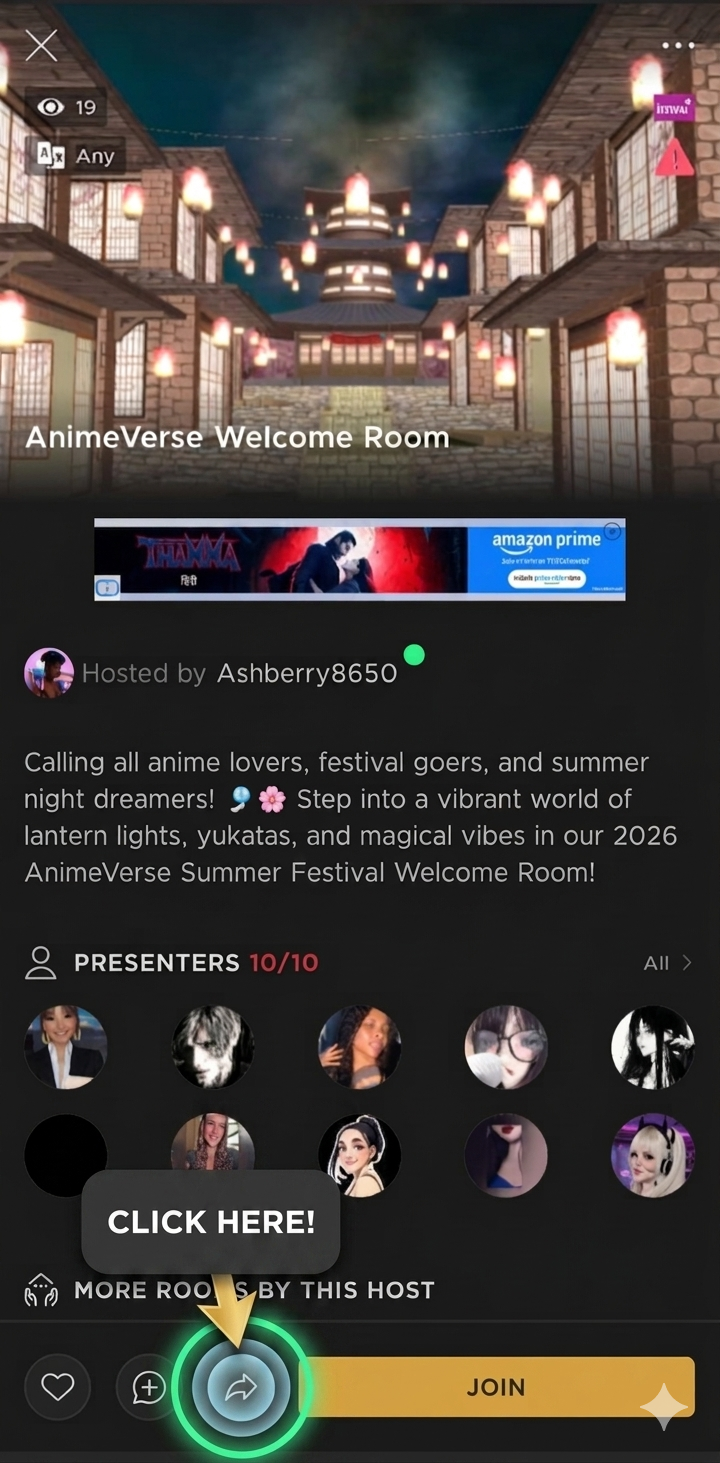
Tap the arrow icon at the top of the room. -
2
Copy the room link
A share sheet pops up. Tap Copy link. IMVU copies the room URL to your clipboard automatically — it'll look like
https://go.imvu.com/chat/room-226939065-59.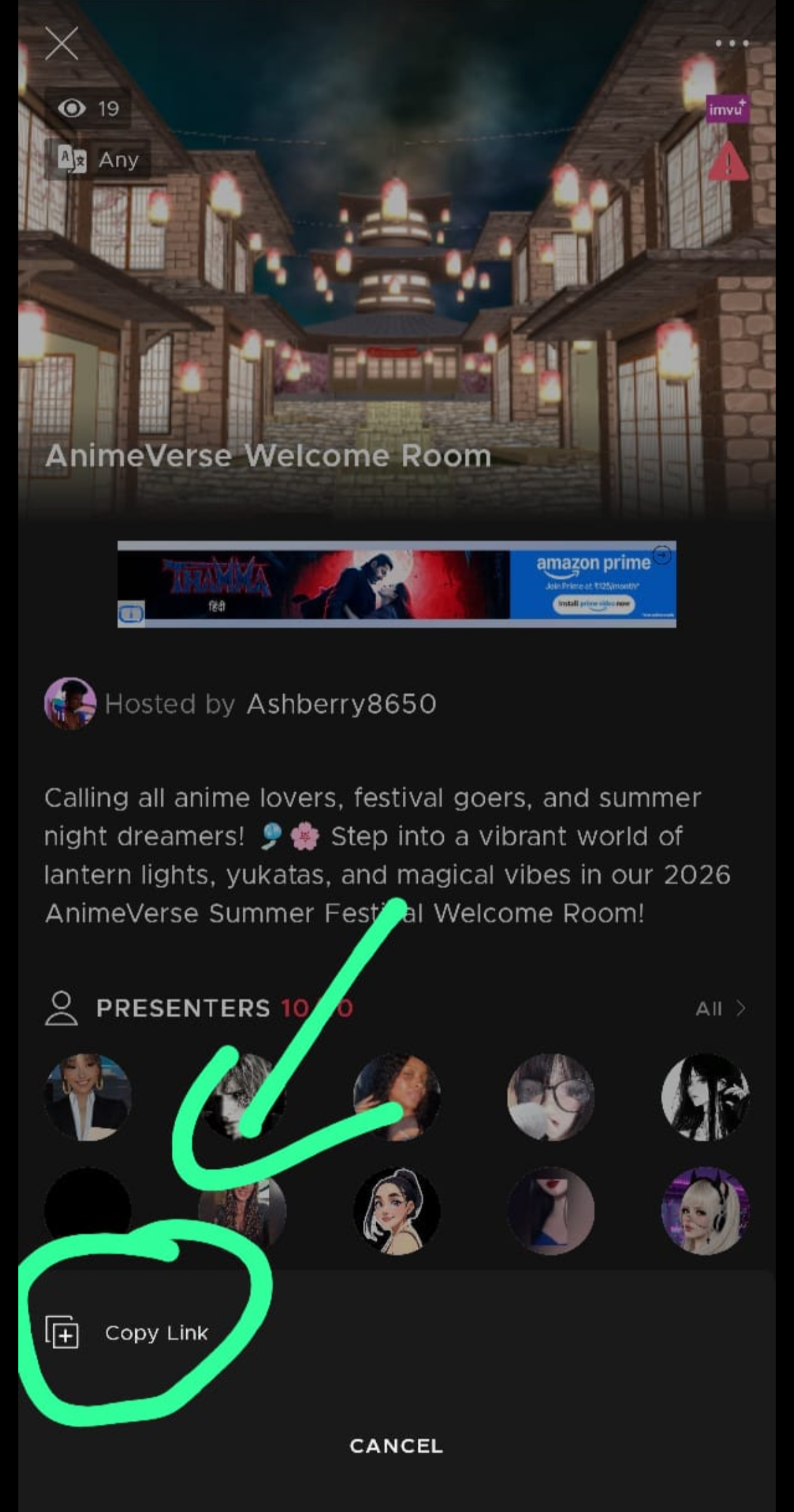
Hit Copy link — IMVU does the rest. -
3
Paste into Live Watch and start
Come back to Catvu Pro, open Live Watch from the menu, and paste the link into the search box. We pull the room ID out of the URL automatically. Tap Start watching.
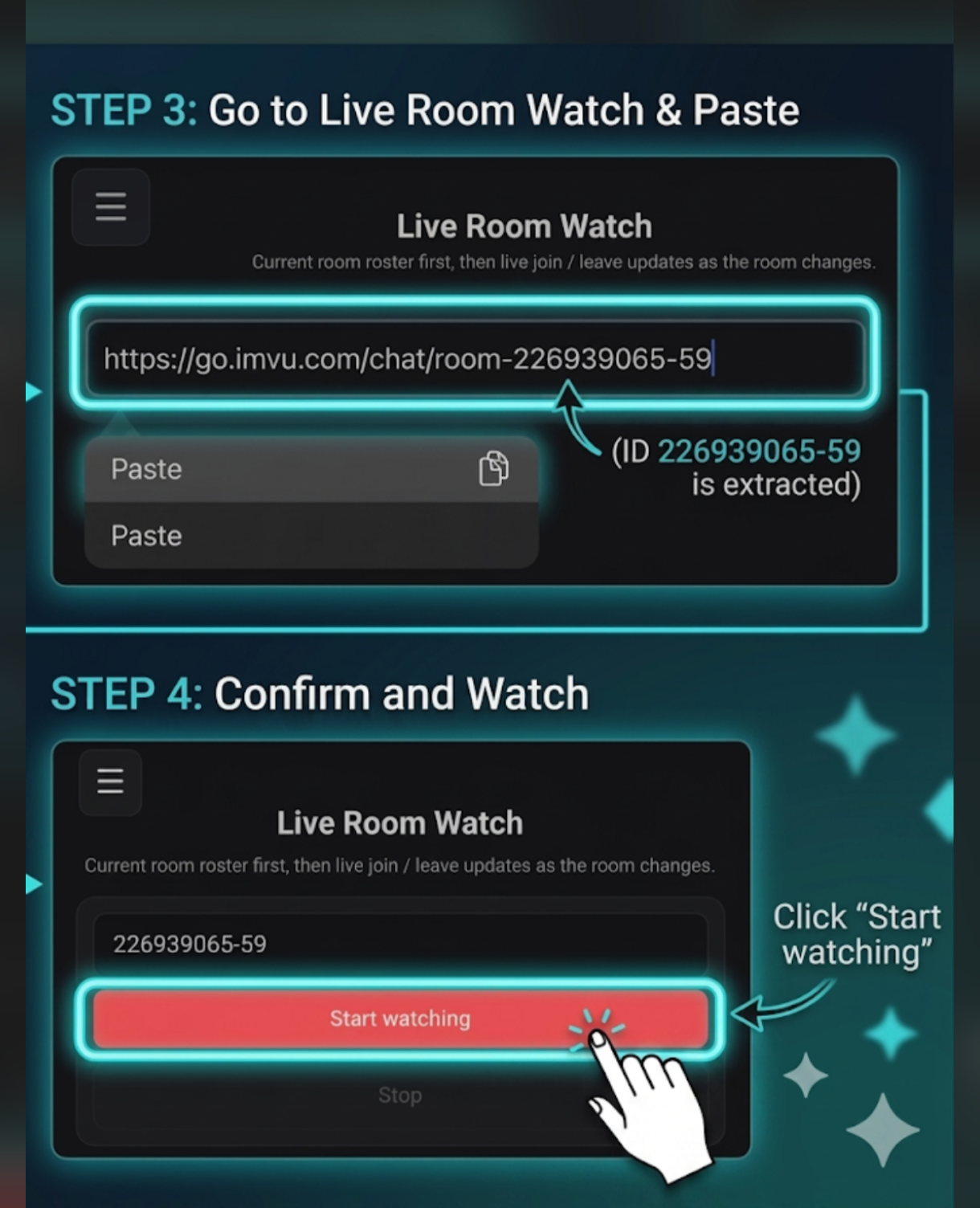
Paste, hit Start watching, you're live.
Tip: this works the same on desktop — right-click the room URL in your browser and paste it in.
Outfits
Coming soon. Outfit browsing will collect captured room and snapshot renders in one place.
Coming soon
Outfit library
This page will become a clean gallery for outfit renders found in room details and snapshots. For now, open any room tile to view outfits inside the room modal.
Send an anonymous whisper 🤫
Drop a secret message into any Catvu music room. The room only ever sees "anonymous" — never your name. One whisper a day, so make it count.
Log in first
Sign in with Discord to send an anonymous whisper.
0/200
Be kind. Every whisper is automatically checked before it's posted — anything hateful, harassing, or unsafe is blocked, and abuse is logged.
Secure checkout via PayPal
Choose Pro
Review your monthly plan and any add-ons before paying.
-
Pro planMonthly subscription, cancel anytime$6.99/mo Included
-
Hide Me creditHides 1 IMVU username from search and analytics$3.99/mo1
Subtotal
$10.98/mo
Total billed monthly
$10.98/mo
- PayPal-secured checkout
- Cancel anytime, no contract
- 30-day refund window
Subscription control
Cancel plan?
You will keep access until the paid period ends.
Room
Participants present when the user last left this room.
Outfits worn during the last visit. For moment-by-moment outfit changes use the Snapshots tab.
Open a room to calculate recent patterns.